Power Portal
The Power Portal is where Area Leaders and Team Leaders mentor their agent mentees and fulfill the communication requirements.
- Organizational Standard
- Roles, Definitions, and Assignments
- Area Leader Addition Procedure
- Area Leader Replacement Procedure
- Team Leader and Team Member Management
- Agent Offboarding
- Power Portal Management FAQ
Organizational Standard
In the Power Portal, there is a specific structure used to organize the workflow. Each subcategory of the organization is an office. The main office is the Power Portal. Below the Power Portal are the four regional offices. Below those regional offices are several states that are in the region. There is yet another level of office for each Leader, and the agent contacts are found within that office, assigned to the appropriate leader team (Area/Team Leader, Broker, etc). In the US platform, it's organized by states. In the Canada platform, it's organized by provinces and territories. For purposes of this document, the term state(s) used also applies to a province or territory.
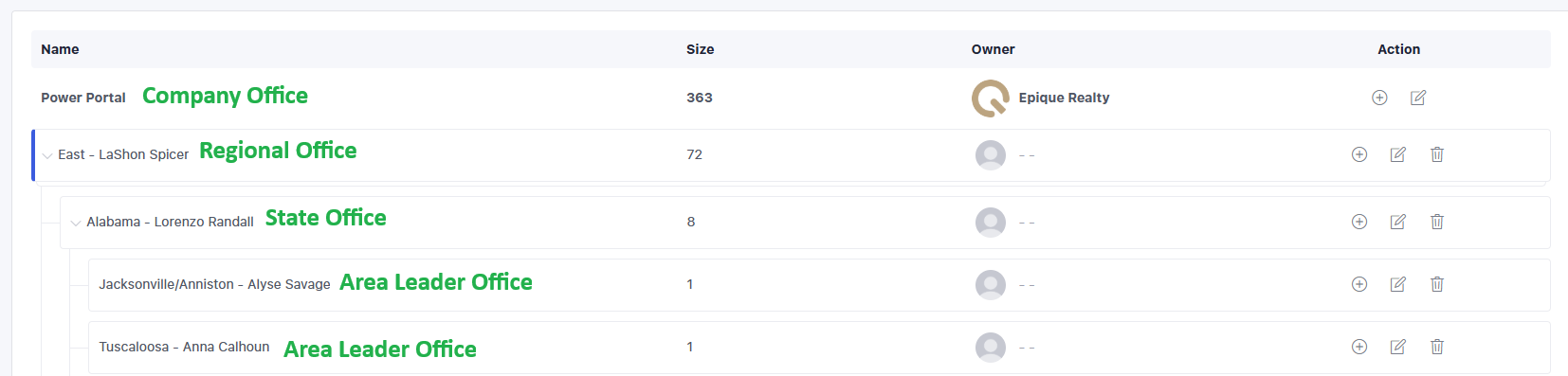
States are named for state but the Area Leader office is named for the area if known and the Leader name. This makes it easy to find the Leader or Area needed to assign leads. The ownership of the lead is with the Office to prevent mistakes in visibility. Visibility works downward, not upward. Regionals can see all the states in their region and all the Area Offices in their region, but cannot see anything outside their region. Brokers can see all Area Offices in their state, but nothing outside of their state. Area Leaders can only see inside their Area Office. Team Leaders are not given an Office, but are assigned to the state office they are licensed in, and the broker has visibility over them, and both the team leader and broker have visibility of the leads/agents on the team.
Terminology for the different roles in the Power Portal is to include several leadership roles.
| Role Name | Definition | Permission Profile | Visibility |
| Lead | Agent mentee, an Epique Agent | N/A | N/A |
| Agent | Area Leader or Team Leader | Standard User | Area Office Only |
| Managing Broker | Official broker of the state | Standard User | State Office Only |
| State Broker | The "assistant" broker of the state | Standard User | State Office Only |
| Second Area Leader | For additional licensed state | Standard User | Area Office Only |
| Second Broker | For additional licensed state | Standard User | State Office Only |
| Third Area Leader | For additional licensed state | Standard User | Area Office Only |
| Third Broker | For additional licensed state | Standard User | State Office Only |
| Regional Director | Leader Director of a Region | Company Admin | Entire Region Office |
| National Director | Leader Director of all Regions | Company Admin | Entire Power Portal |
| State Leader | Assists the State Broker | Standard User | State Office Only |
| Wildcard for future expansion | N/A | N/A | N/A |
| Wildcard for future expansion | N/A | N/A | N/A |
Permission Profiles
Standard Users include Area Leaders, Team Leaders, Brokers, and State Leaders. These roles cannot manage or make changes to user assignments, cannot create or modify the organizational hierarchy, or make major changes to the leads.
Company Admin includes Regional Directors, National Director, and Epique Staff/Support. These roles can perform all the things that Standard Users cannot. Leads that need to be reassigned to a leader or broker will be managed by the Regional or National Director, not the Broker or Area/Team Leader.
Lead Types
There are two lead types for agent leads: Agent and Other. All other lead types are disabled (buyer, seller, etc).
Agent: Active Epique agents
Other: Non-active agent who has left Epique
Former Epique agents will be archived in the Power Portal, utilizing a placeholder agent user seat (dummy seat). The Admin team will be responsible for moving the former agent from the current leadership assignment to the archived seat. Once an agent is offboarded from Epique, leaders and brokers will no longer see the agent in the Power Portal. Only the Admin team will have access to that.
Roles, Definitions, and Assignments
- Agent
- The Area Leader or Team Leader assigned to the lead/contact
- Managing Broker
- The official broker for the state
- State Broker
- The assistant broker for the state
- Second Area Leader
- The area leader for agents licensed in a second state
- Second Broker
- The broker for agents licensed in a second state
- Third Area Leader
- The Area Leader for agents licensed in a third state
- Third Broker
- The broker for agents licensed in a third state
- Regional Director
- The area leader regional director
- ernestoumana@epique.me West
- roberthallrealtor@gmail.com Midwest
- annikadalton@epique.me Central
- lashonspicer@epique.me East
- The area leader regional director
- National Director
- State Leader
- The state leader who assists the broker of the state
Area Leader Addition Procedure
When a new Area Leader is appointed to the role, there are a few things that need to be done in the Power Portal. Keep in mind that all agents who join Epique are added to the Power Portal as a lead and assigned to the state broker as appropriate. For a new area where a leader is created, this is the process:
- Create Area Office
- Add user to Power Portal and assign to Area Office
- Assign leads to the Area Leader as the Agent role
Each of the above steps is detailed below.
Create Area Office
The Regional Director will toggle into the Power Portal. Click on Settings on the top menu and then Organization Hierarchy on the left menu. You will see your Regional Office, and you may have to click to expand so the states are visible. By the state office where the Leader is located, click the + icon in the Action column on the far right. Enter the office name as the Area Leader's name. If you know the specific area, you can use the format: Area - Leader Name, such as "Grand Rapids - Sylvia Dana". Make no other changes. Click Add.
Add Leader to Power Portal as User
On the Settings > Users screen, click on + Add Agent in the upper right corner. Use the Area Leader's name or email to search for them. Start with email, and if you can't find them, then use their name. It will be the same as their User seat in the main Enterprise in Lofty. You can only invite Active status users from the main Enterprise account into the Power Portal. If the name or email search isn't working, email Adam Frank, Lofty Liaison, at loftyliaison@epiquerealty.com for assistance.
Assign leads to the Area Leader Agent Role
On the People page, locate the agents who need to be assigned to the Area Leader. You can filter based on the state broker to narrow it down more. Once you find an agent, you can mark the checkbox in front of their name, then above the columns, you will see an option named More. Click it and then select Assign. Each role is visible, and you can select to assign it to the agent (Area/Team Leader) or other roles if needed. The broker, regional, national, and state leaders should be accurate already. Click Save to make the change.
Area Leader Replacement Procedure
If an Area Leader steps down or leaves Epique, and there is an Area Leader who will replace them, the following process applies.
- Follow the steps outlined in the Area Leader Addition Procedure document to add the new Area Leader to the Power Portal. If it's a current Area Leader who is taking over, skip that step.
- Reassign the leads to the new Area Leader.
- Remove the old Area Leader from the Power Portal.
- Rename the Area Office with the new/current Area Leader's name
Details are below for steps 2 and 3.
Reassign the leads to the new Area Leader
Filter for the Agent assigned to the leads being the current departing Area Leader. Select all leads and then in the upper menu to the right, select More and then Assign. In the Agent role, search and select the new Area Leader, then click Save.
In the event there is no replacement Area Leader available, follow the above process, but assign the Agent role as the Managing Broker. They will be the Agent role and the Managing Broker role, which is fine. A lead has to be assigned to an Agent user. EXAMPLE: An agent in Michigan steps down as Area Leader, but there is no replacement Area Leader. Mike Blake is the assigned Managing Broker. Those leads would be assigned to Mike Blake in the Agent role as well, meaning his name is assigned twice to them for two different roles. When a replacement Area Leader is found, the leads will be reassigned to them in the Agent role, and Mike Blake will still be assigned in the Managing Broker role.
Remove the old Leader from the Power Portal
In Settings > Users, find the Leader and click the three-dot menu in the Actions column. Select Delete User. There will be a host of warnings that come up. Please note that all leads have been reassigned, no websites are used in the Power Portal, and this change will not affect their Enterprise seat in the main account - only in the Power Portal.
Rename the Area Leader Office
In Settings > Organization Hierarchy, find the Area Leader Office, then click the pen/paper icon to edit. In the name field, update the name to the current Area Leader and click Save.
Team Leader and Team Member Management
Team Leaders serve as the Area Leader for their team members. The Teams Division will manage the Team Leaders and Team Member roster and assignment.
When a new Team Leader is appointed to the role, there are a few things that need to be done in the Power Portal. Keep in mind that all agents who join Epique are added to the Power Portal as a lead and assigned to the managing broker as appropriate. For a new team where a leader is created, this is the process:
- Add Team Leader to Power Portal as a user and assign to State Office
- Create Agent Tag with the name of the team
- Create lead tag with the name of the team
- Tag and assign leads to the Team Leader as the Agent role
Each of the above steps is detailed below.
Add Leader to Power Portal as User and Assign to State Office
On the Settings > Users screen, click on + Add Agent in the upper right corner. Use the Team Leader's name or email to search for them. Start with email, and if you can't find them, then use their name. It will be the same as their User seat in the main Enterprise in Lofty. You can only invite Active status users from the main Enterprise account into the Power Portal. If the name or email search isn't working, email Adam Frank, Lofty Liaison, at loftyliaison@epiquerealty.com for assistance. If the Team Leader is also an Area Leader for non-team members, they will be assigned an Area Office for their area mentees. Do not change their office to the State Office; leave/assign them in the Area Office.
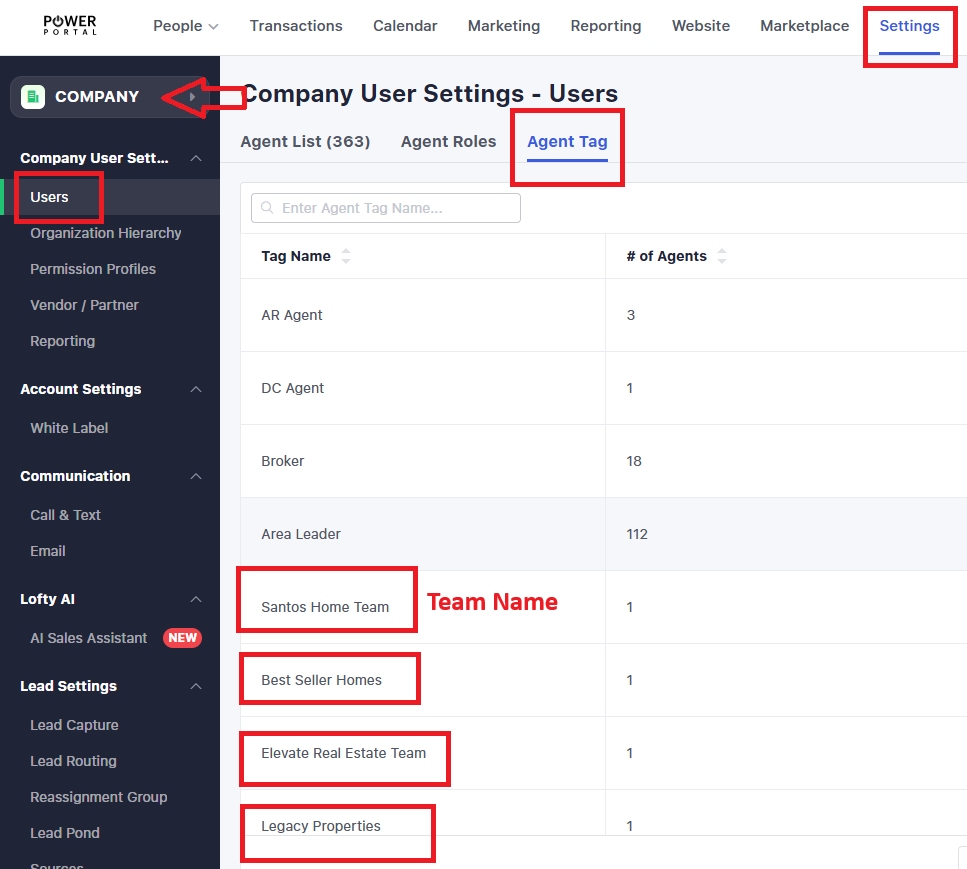
Create Agent Tag with the Team Name
On the Settings > Users screen, click the Agent Tag tab, then click Add New in the upper right corner. Enter the team name.
Create Lead Tag with the Team Name
On the Settings > Users screen, click the Tag link on the left side menu. Make sure the Company is selected for the settings in the upper left corner, then click Add New in the upper right corner (blue button). Enter the team name.
Tag and Assign leads to the Team Leader Agent Role
On the People page, locate the agents who need to be assigned to the Team Leader. You can filter based on the managing broker to narrow it down more. Once you find an agent, you can mark the checkbox in front of their name, then above the columns, you will see an option named More. Click it and then select Assign. Each role is visible, and you can select to assign it to the Agent role (Area/Team Leader) or other roles if needed. The broker, regional, national, and state leaders should be accurate already. Click Save to make the change.
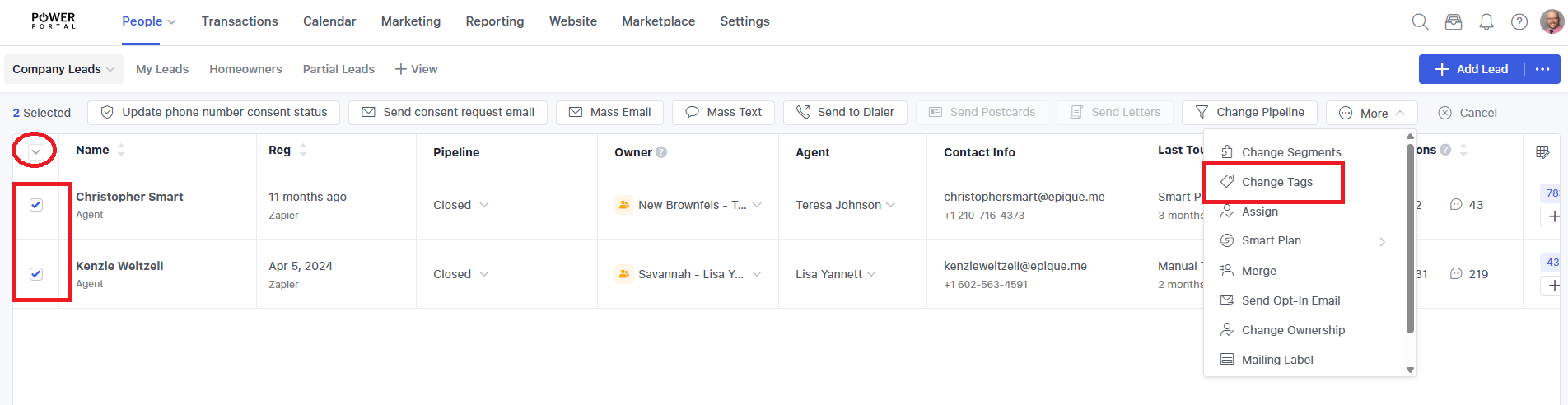
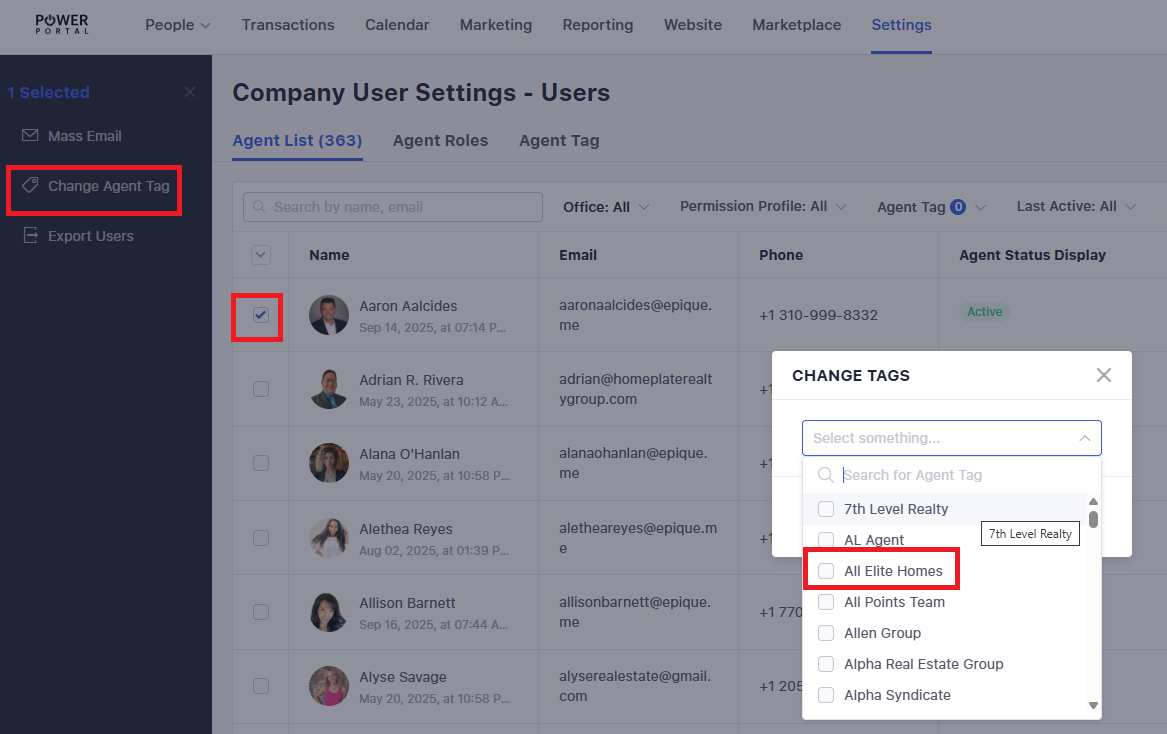
Once all team members have been assigned to the Team Leader, click the filter funnel in the upper right corner of the People page. Scroll down to the Agent role and enter the Team Leader name. The list of team members will be shown. Click the dropdown arrow in the upper left corner of the screen and the pipeline menu will be replaced by an action menu. Click Change Tags. Search for the team name, mark the checkbox in front of the tag, then click Save.
Agent Offboarding
When an agent requests to leave Epique and offboard from the brokerage, a few things in the Power Portal need to happen.
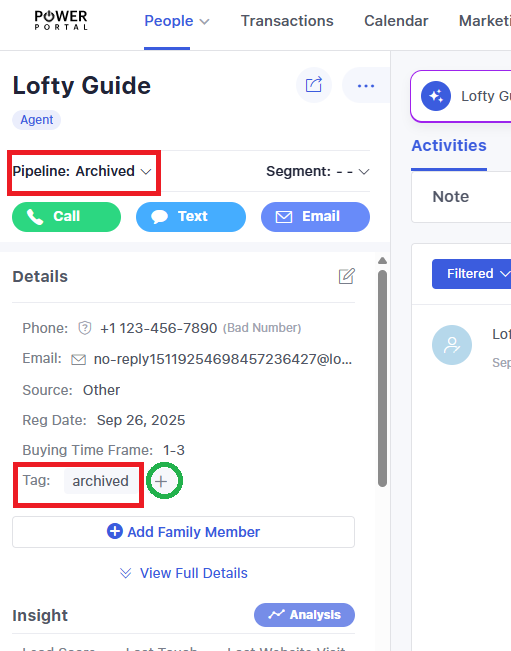
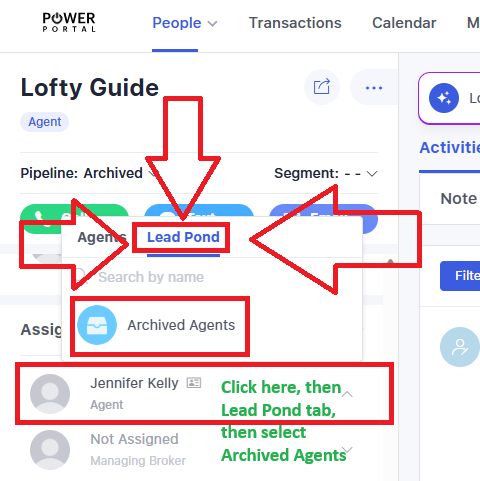
- On the People page, the agent lead should be moved to the Archived pipeline, tagged as archived, and the Agent role in the profile should be changed to Archived Agents
- Click on the lead name to view the profile
- Click Pipeline and select Archived
- Click the + icon in the Tag section and search/select archived (as shown in screenshot)
- Scroll down on the left side until the Assignment roster is shown
- Click the Agent field, then click the Lead Pond tab, then select Archived Agents
- This change to the Pond will instantly remove all assigned roles and replace the Agent role with the lead pond name, Archived Agents
-
- From this point, only select Admins will have access to see these agent leads
-
The agent lead will then be kept in that lead pond. If the agent rejoins, they can be brought out of the lead pond and information updated as needed.
Power Portal Management FAQ
Who manages all of this? Who do I go to when I need help?
That depends on what is needed and what your role is. Most of it will be managed by Epique leaders and staff. Some may need to involve Lofty. Here's a simple breakdown:
Regional Directors will manage the roster for Area Leaders. This includes assigning leads to the proper Area Leader, Broker, and other roles in the lead profile. The National Director will support the Regional Directors.
Teams Division will manage the roster for Team Leaders. This includes assigning team members to the proper Team Leader in the lead profile.
Lofty Support should never be contacted about anything in the Power Portal by a Team Leader, Area Leader, or Broker. If the concern is regarding the roster of leads, visibility, or status changes, the Regional Director or the Teams Division is the point of contact. For technical issues, the point of contact is Adam Frank, Lofty Liaison for Epique Realty. If it's determined there is a glitch that needs fixing, he will submit a support ticket to Lofty for assistance. Lofty Support has no clue what the Power Portal is, so getting technical assistance must be done through proper channels.
How do I contact them for help?
Regional Directors:
Midwest roberthallrealtor@gmail.com
Central annikadalton@epique.me
National Director jilllutz@epique.me
Teams Division: teams@epiquerealty.com
Lofty Liaison: loftyliaison@epiquerealty.com
Do I get a Lofty number or a call package as a leader?
Yes. You get a personal Lofty number and 100 minutes of call time per month. You also get 5,000 texts per month.
Why don't I get a website?
A Lofty website is used to market your business to generate leads. The Power Portal is not a marketing tool; it's a communication tool. As such, a website will not be created for you.
Are there Smart Plans set up to keep in touch with my mentees?
Sort of. Leadership in general doesn't want automated drips being sent to your mentees. At the "company" level in the Power Portal, there is a Smart Plan to guide the tasks you need to help your mentees with. Anything in the company library is authorized for automation to your mentees and is automatically applied to agent mentees the moment they are added to the Power Portal.
How do I move between the Power Portal and my regular Lofty?
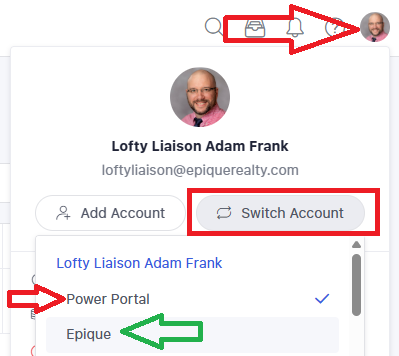
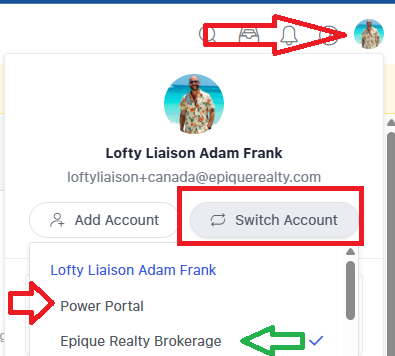
In the upper right corner, click your avatar menu, which is the circle picture. Then select Switch Account and pick either Power Portal or Epique/Epique Realty Brokerage.
US experience:
For the Canada account, the main account is called Epique Realty Brokerage.
Canada experience:
The best way to get your bearings on where you are is "look left". Look at the logo in the upper left corner. That will dictate where you are.
Main Enterprise Lofty

Power Portal Lofty
