
Agent Offboarding
When an agent requests to leave Epique and offboard from the brokerage, a few things in the Power Portal need to happen.
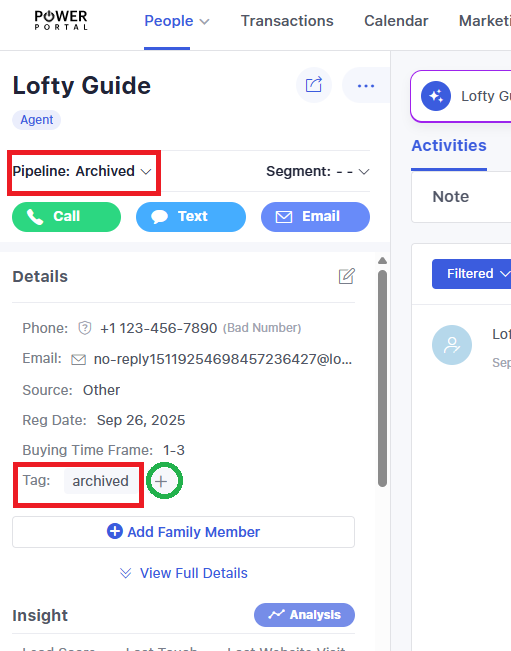
- On the People page, the agent lead should be moved to the Archived pipeline, tagged as archived, and the Agent role in the profile should be changed to Archived Agents
- Click on the lead name to view the profile
- Click Pipeline and select Archived
- Click the + icon in the Tag section and search/select archived (as shown in screenshot)
- Scroll down on the left side until the Assignment roster is shown
- Click the Agent field, then click the Lead Pond tab, then select Archived Agents
- This change to the Pond will instantly remove all assigned roles and replace the Agent role with the lead pond name,
OffboardingArchived Agents
-
- From this point, only select Admins will have access to see these agent leads
-
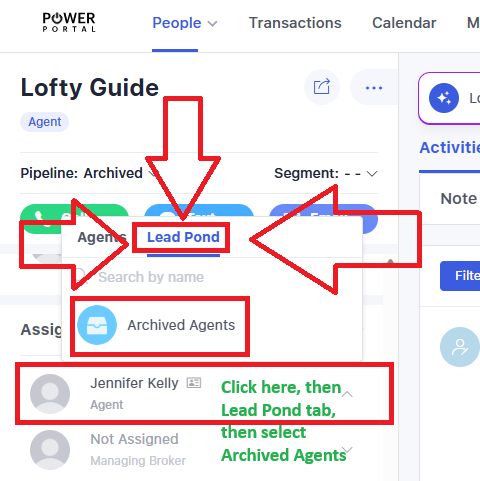
The agent lead will then be kept in that lead pond. If the agent rejoins, they can be brought out of the lead pond and information updated as needed.