
Organizational Standard
In the Power Portal, there is a specific structure used to organize the workflow. Each subcategory of the organization is an office. The main office is the Power Portal. Below the Power Portal are the four regional offices. Below those regional offices are several states that are in the region. There is yet another level of office for each Leader, and the agent contacts are found within that office, assigned to the appropriate leader team (Area/Team Leader, Broker, etc). In the US platform, it's organized by states. In the Canada platform, it's organized by provinces and territories. For purposes of this document, the term state(s) used also applies to a province or territory.
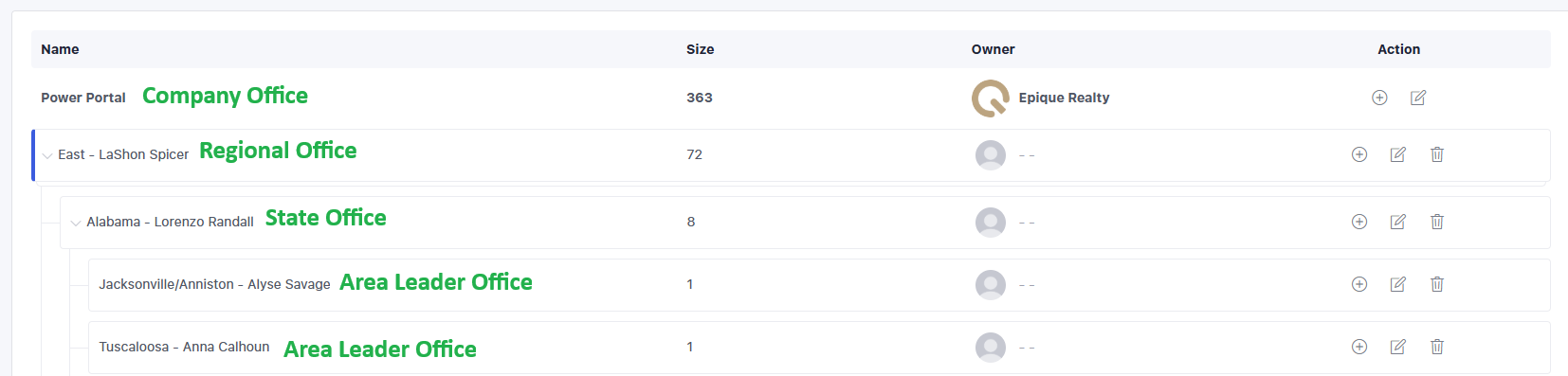
States are named for state but the Area Leader office is named for the area if known and the Leader name. This makes it easy to find the Leader or Area needed to assign leads. The ownership of the lead is with the Office to prevent mistakes in visibility. Visibility works downward, not upward. Regionals can see all the states in their region and all the Area Offices in their region, but cannot see anything outside their region. Brokers can see all Area Offices in their state, but nothing outside of their state. Area Leaders can only see inside their Area Office. Team Leaders are not given an Office, but are assigned to the state office they are licensed in, and the broker has visibility over them, and both the team leader and broker have visibility of the leads/agents on the team.
Terminology for the different roles in the Power Portal is to include several leadership roles.
| Role Name | Definition | Permission Profile | Visibility |
| Lead | Agent mentee, an Epique Agent | N/A | N/A |
| Agent | Area Leader or Team Leader | Standard User | Area Office Only |
| State Broker | Primary broker of the state | Standard User | State Office Only |
| Managing Broker | The "assistant" broker of the state | Standard User | State Office Only |
| Second Area Leader | For additional licensed state | Standard User | Area Office Only |
| Second Broker | For additional licensed state | Standard User | State Office Only |
| Third Area Leader | For additional licensed state | Standard User | Area Office Only |
| Third Broker | For additional licensed state | Standard User | State Office Only |
| Regional Director | Leader Director of a Region | Company Admin | Entire Region Office |
| National Director | Leader Director of all Regions | Company Admin | Entire Power Portal |
| State Leader | Assists the State Broker | Standard User | State Office Only |
| Wildcard for future expansion | N/A | N/A | N/A |
| Wildcard for future expansion | N/A | N/A | N/A |
Permission Profiles
Standard Users include Area Leaders, Team Leaders, Brokers, and State Leaders. These roles cannot manage or make changes to user assignments, cannot create or modify the organizational hierarchy, or make major changes to the leads.
Company Admin includes Regional Directors, National Director, and Epique Staff/Support. These roles can perform all the things that Standard Users cannot. Leads that need to be reassigned to a leader or broker will be managed by the Regional or National Director, not the Broker or Area/Team Leader.
Lead Types
There are two lead types for agent leads: Agent and Other. All other lead types are disabled (buyer, seller, etc).
Agent: Active Epique agents
Other: Non-active agent who has left Epique
Former Epique agents will be archived in the Power Portal, utilizing a placeholder agent user seat (dummy seat). The Admin team will be responsible for moving the former agent from the current leadership assignment to the archived seat. Once an agent is offboarded from Epique, leaders and brokers will no longer see the agent in the Power Portal. Only the Admin team will have access to that.