
Team Office
A Team Office in Lofty is part of the organizational hierarchy. On the Epique Lofty platform, the company is at the highest level, followed by the states/provinces, and within those states/provinces are the Team Offices. As a matter of practice, the Team Office is organized under the state office of the team leader's primary license (typically the state they reside in). This doesn't interfere with any agent function in Lofty. Agents will still have access to their state lead pond. Below is a screenshot of what the organizational hierarchy looks like in Lofty with Team Offices. You won't see this on your account, but this is to provide clarity as to how the Team Add On fits into the Epique platform.
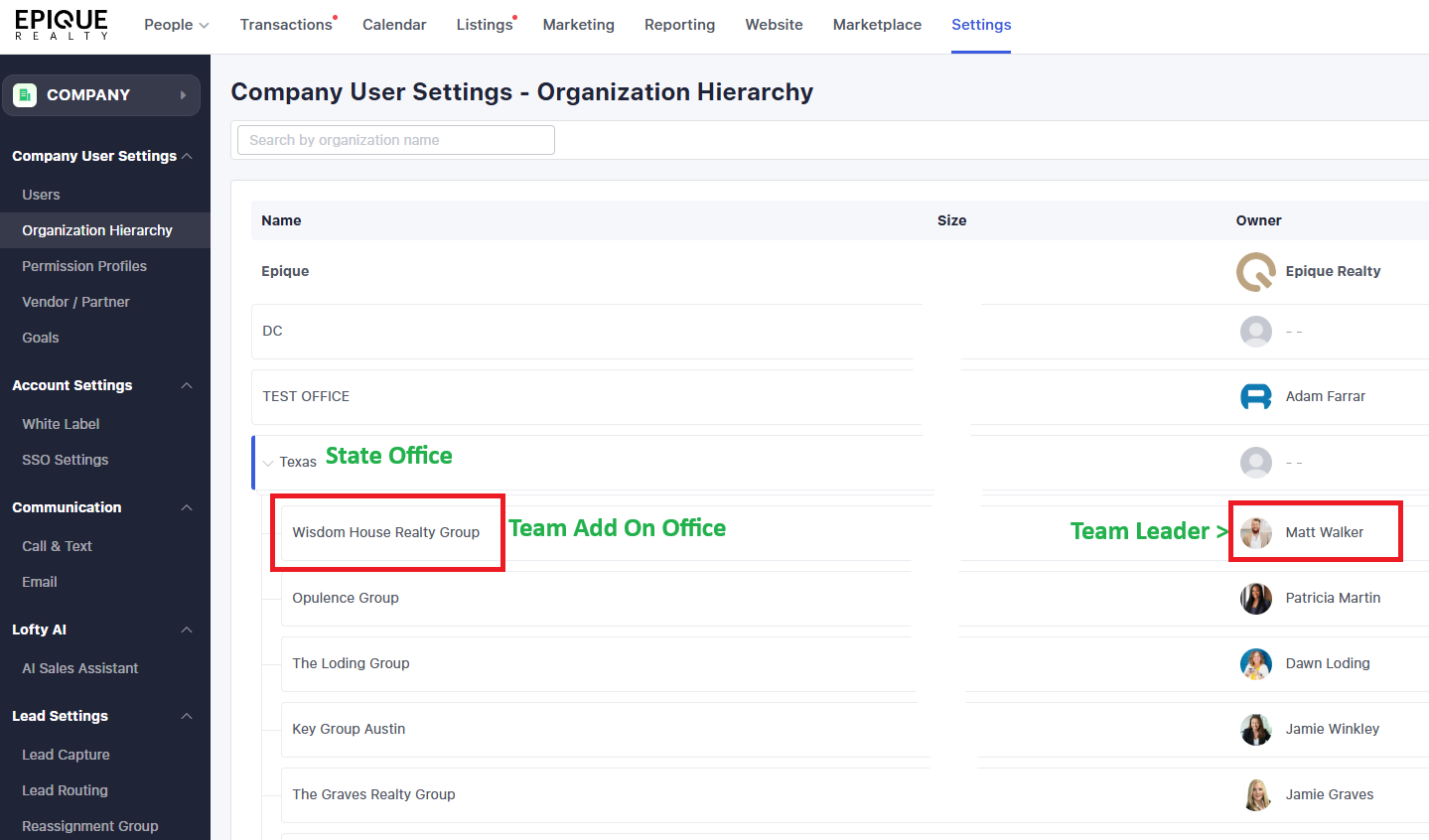
To obtain a Team Add On covered as an Epique Benefit, here are the steps:
- Reach out to the Teams Division at teams@epiquerealty.com and request a Team Add On in Lofty for your team
- They will ask if you have any upgrades, a Private Instance, or any special considerations
- If so, they will bring in Adam Frank, the Epique Lofty Liaison, for review and consult if needed to determine how to proceed
- If you are an official team in Epique, you qualify for a Team Add On
- Once approved, the Teams Division will start up your Team Office, add you as the office owner, and add your team members to the Team Office
NOTE: As of this writing, there is no provision for a non-Epique agent/assistant to access or be added to the system to perform their duties.
No Comments